Forgejo
Woodpecker 内置支持 Forgejo。要启用 Forgejo,您应该使用以下环境变量配置 Woodpecker 容器:
WOODPECKER_FORGEJO=true
WOODPECKER_FORGEJO_URL=YOUR_FORGEJO_URL
WOODPECKER_FORGEJO_CLIENT=YOUR_FORGEJO_CLIENT
WOODPECKER_FORGEJO_SECRET=YOUR_FORGEJO_CLIENT_SECRET
Forgejo 与容器在同一主机上
如果您在容器内也在同一主机上运行 Forgejo,请确保代理可以访问它。
代理尝试使用 Forgejo 通过其 API 报告的 URL 进行克隆。为了简化连接,您应该将 Woodpecker 代理添加到与 Forgejo 相同的 docker 网络中。
否则,通信应该通过 docker0 网关(通常是 172.17.0.1)。
要配置 Docker 网络,如果网络名称是 forgejo,请按如下方式配置:
 services:
   [...]
   woodpecker-agent:
     [...]
     environment:
       - [...]
+      - WOODPECKER_BACKEND_DOCKER_NETWORK=forgejo
注册
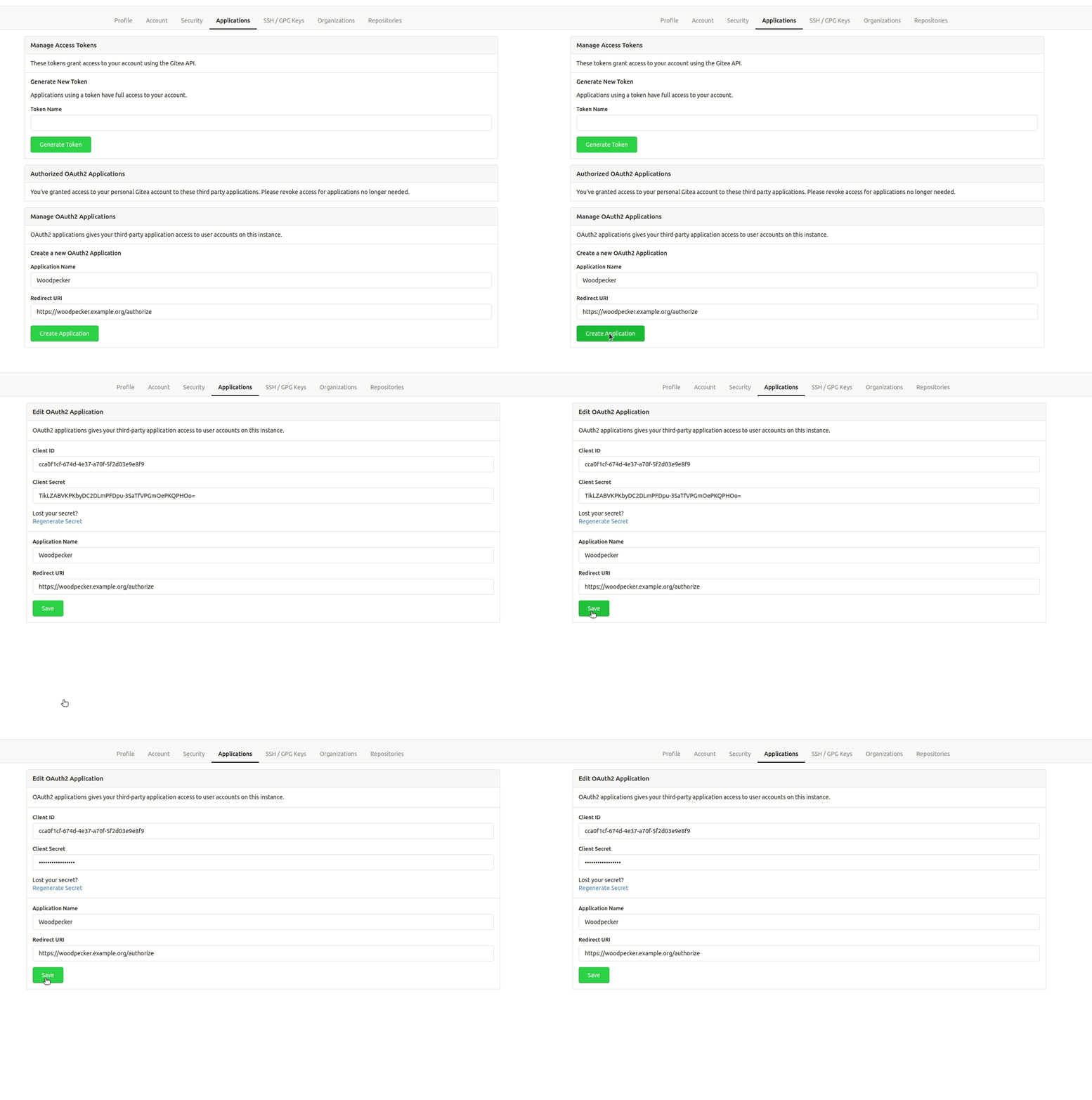
向 Forgejo 注册您的应用程序以创建您的客户端 ID 和密钥。您可以在 Forgejo 的 OAuth 应用程序设置中找到 https://forgejo.<host>/user/settings/。非常重要的是,授权回调 URL 必须与您的 http(s) 方案和主机名完全匹配,路径为 https://<host>/authorize。
如果您在与 Forgejo 实例相同的主机上运行 Woodpecker CI 服务器,您可能还需要允许 Forgejo 的本地连接。否则 webhooks 将失败。将以下行添加到您的 Forgejo 配置中(通常在 /etc/forgejo/conf/app.ini 中)。
[webhook]
ALLOWED_HOST_LIST=external,loopback
有关参考,请参阅 Configuration Cheat Sheet。
确保您的 Forgejo 配置允许使用固定的页面长度 50 请求 API。最大页面大小的默认值是 50,但如果您设置的值低于 50,一些 Woodpecker 功能将无法正常工作。另请参阅 Configuration Cheat Sheet。
Configuration
This is a full list of configuration options. Please note that many of these options use default configuration values that should work for the majority of installations.
FORGEJO
- Name:
WOODPECKER_FORGEJO - Default:
false
Enables the Forgejo driver.
FORGEJO_URL
- Name:
WOODPECKER_FORGEJO_URL - Default:
https://next.forgejo.org
Configures the Forgejo server address.
FORGEJO_CLIENT
- Name:
WOODPECKER_FORGEJO_CLIENT - Default: none
Configures the Forgejo OAuth client id. This is used to authorize access.
FORGEJO_CLIENT_FILE
- Name:
WOODPECKER_FORGEJO_CLIENT_FILE - Default: none
Read the value for WOODPECKER_FORGEJO_CLIENT from the specified filepath
FORGEJO_SECRET
- Name:
WOODPECKER_FORGEJO_SECRET - Default: none
Configures the Forgejo OAuth client secret. This is used to authorize access.
FORGEJO_SECRET_FILE
- Name:
WOODPECKER_FORGEJO_SECRET_FILE - Default: none
Read the value for WOODPECKER_FORGEJO_SECRET from the specified filepath
FORGEJO_SKIP_VERIFY
- Name:
WOODPECKER_FORGEJO_SKIP_VERIFY - Default:
false
Configure if SSL verification should be skipped.